How to find duplicates in an Excel column with Maplesheet
26 June 2026Excel can't find duplicates that are close but not identical. Two
values have to match letter for letter, or Excel treats them
as different. So Apple and Apple (with a trailing space) are
different. john@x.com and John@x.com are different. Acme Inc and
Acme, Inc. are different. That's why you can run Remove Duplicates
and still see obvious repeats in your sheet.
Maplesheet's duplicate finder takes a more practical approach. It can catch exact matches and near-duplicates, and it shows every group before anything is removed.
How to use it
1. Open the tool and drop your file in
Head to maplesheet.com/find-duplicates, then drag
your .xlsx or .csv onto the page. Your workbook opens right in the
in-browser viewer.
2. Pick where to search
Use the Search in options to focus the scan:
- Whole workbook: every sheet.
- Sheet: one specific worksheet.
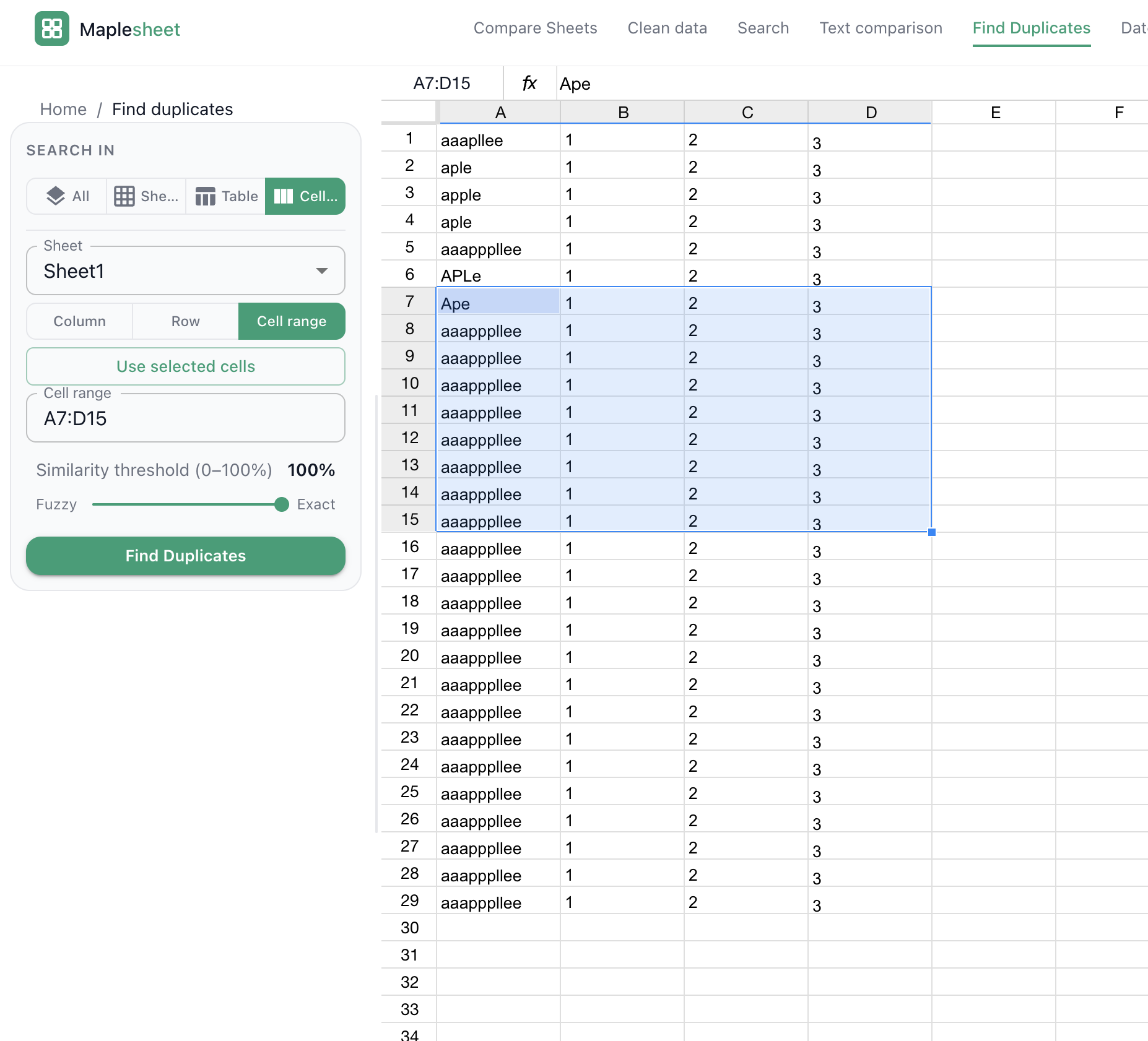
- Range: a column (
A), a row (5), a list (A, C, E), a span (A:C), or a specific block (B2:B500).
You don't have to type the range by hand. Just click anywhere on the spreadsheet, on a column header, a row number, or a single cell, and Maplesheet fills in the matching column, row, or cell range for you.
For the classic "find duplicates in a column" job, you'll usually enter
a single column like A or B.
3. Choose how strict the match should be
The Similarity threshold slider moves from Fuzzy (0%) to Exact (100%). What you choose depends on how messy the data is:
- 100%: only identical values match, the same as Excel's built-in duplicate logic.
- 90–99%: picks up trailing spaces, capitalization changes, and small mistakes ("Acme Inc" vs "Acme, Inc").
- 70–89%: catches looser variations ("John Smith" vs "Jon Smyth"), handy for customer lists, addresses, product names.
A good habit is to start at 100%, then step it down only if you think the sheet has inconsistent formatting or "dirty" entries.
4. Click Find
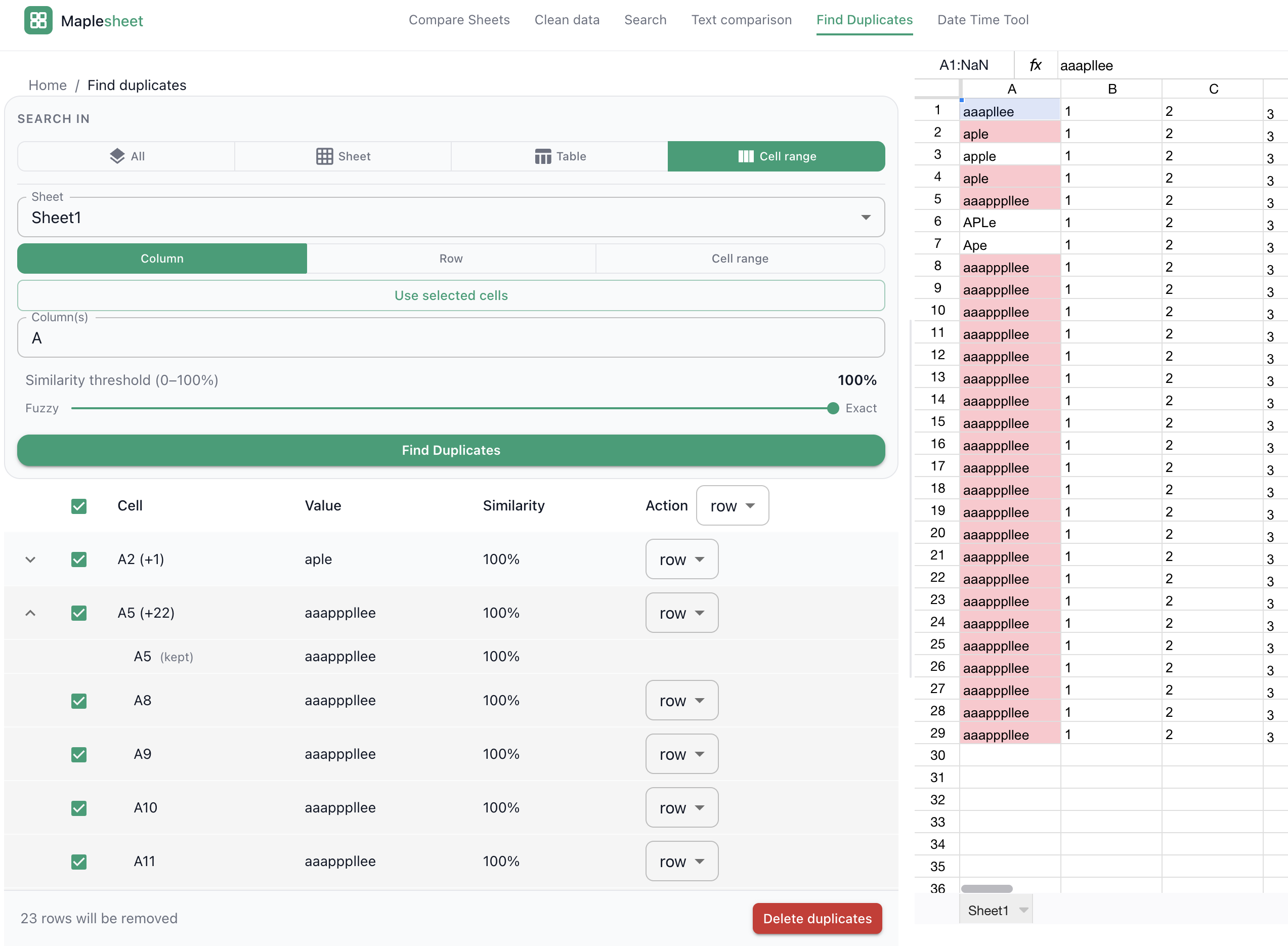
Press Find. Duplicates show up highlighted in a light red (the familiar Excel shade), and you'll also see them grouped in a results table underneath. Each group lists the first cell address, the value, and the count of matches found.
5. Review each group
Open a group to see every cell included.
The first entry in each group is the kept representative, it's protected from deletion. Everything else is selected for removal by default, though you can uncheck anything you'd rather keep.
For each duplicate, choose what gets removed:
- Cell: clear only that cell's value.
- Row: remove the whole row.
- Column: remove the whole column.
You can set this per group, per cell, or across all groups using the
dropdown at the top of the table.
6. Apply and download
Click Apply. Maplesheet rewrites the original file while keeping
formulas, charts, pivot tables, formatting, and validations intact.
Then Download Excel appears so you can save the cleaned .xlsx.
What makes it different from Excel's built-in features
| Excel built-in | Maplesheet | |
|---|---|---|
| Exact-match duplicates | Yes | Yes |
| Trailing-space / case differences | No | Yes |
| Typos and near-duplicates | No | Yes |
| Preview before deleting | No | Yes |
| Pick what to delete (cell / row / column) | Row only | All three |
| Keeps charts, pivots, validations | Yes | Yes |
Tips
- Only have a list, not a full workbook? Paste it into the list version, no file required.
- Need to compare two columns? Include both in the range (for
example,
A, C) and run with your chosen threshold. Duplicates across columns will be grouped together. - Numbers stored as text will match other text numbers, but won't
match true numeric cells. If you need them treated the same, convert
first using
VALUE().
FAQ
Does it work with .csv files?
Yes. CSV files are converted to .xlsx when opened, and the cleaned
download comes out as .xlsx.
Will my formulas, charts, and pivot tables survive? Yes. Maplesheet edits your original file rather than reconstructing it from scratch, so non-data content stays in place.
Can I undo a deletion? There's no in-app undo, but your original file on disk isn't changed. The cleaned file is a separate download, keep the original until you've checked the results.